

 Bot forPokelegendaGame website: pokelegenda.ru
 Pokelegenda bot
PlayBots bot for Pokelegenda at pokelegenda.ru: auto-battle, catching and Mega Evolution settings. Interface screenshots, access and setup help.
Open all screenshots (31)
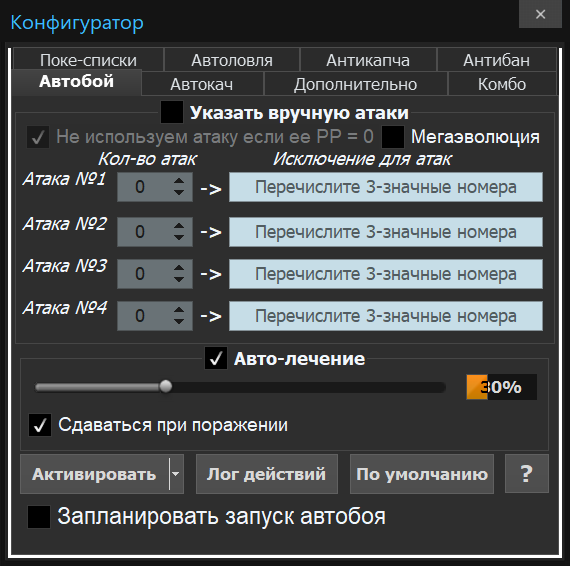
- Move order and auto-battle settings
- Client showing the Pokelegenda login page
- Меню автоматизации Pokelegenda
- Pokémon catching settings
- Auto-leveling
- Условия остановки боя
- Комбинации действий
- Pokémon lists
- Captcha service settings
- Паузы и ограничения автобоя
- Auto-leveling scheduler
- Редкая ловля
- Ловля по критериям
- Покебаза
- Мониторинг торговли
- Дневник тренера
- Калькулятор статов и урона
- Журнал покемонов
- Напоминания
- Таблица боёв
- Уведомления автобоя
- Маршрут лечения
- Справка по планировщику автокача
- Меню автолечения
- Вспомогательные инструменты
- Client options
- Операции с покебазой
- Сортировка покебазы
- Фильтры покебазы
- Справочные разделы
- Имя NPC для лечения
About the bot
The PlayBots client for Pokelegenda at pokelegenda.ru includes battle and catching configuration. A distinct control in the inspected interface is the Mega Evolution switch. Boss attacks and location searches appear as menu entries but have not been tested in-game. Confirm the scenario you need for your account before activation.
- Auto-battle
- Auto-catch
- Auto-healing
- Battle scheduling
- Boss attacks
- Search a location
Show all — 28
Battle and healing
- Auto-battle
Settings for four moves, repetition counts and exclusions
- Auto-healing
Порог лечения, посещение покецентра, имя NPC и скорость лечения.
- Battle scheduling
Battle scheduling switch
Catching Pokémon
- Auto-catch
Pokémon, ball and post-catch action selection
Additional options
- Boss attacks
Отдельный пункт меню автоматизации
- Search a location
Отдельный пункт меню автоматизации
- Automated advertising
Отдельный пункт меню автоматизации
- Change location when crowded
Отдельный пункт меню автоматизации
- Pokémon breeding
Отдельный пункт меню автоматизации
- Mega Evolution
Отдельный переключатель в автобое
Бой, лечение и прокачка
- Auto-leveling
ID покемона, целевой уровень, ограничения противника и плохой погоды.
- Условия остановки боя
Уровень и опыт, характеристики противника, условия сдачи и добиватель.
- Комбинации действий
Пять комбинаций с тремя действиями, повторами, лечением и условием против шайни.
- Паузы и ограничения автобоя
Лимиты покемонов, денег и времени, реакции на чат и обмен, случайные перерывы.
- Auto-leveling scheduler
Список покемонов с отдельным целевым уровнем и флажком Скоба для каждой строки.
- Уведомления автобоя
Выбор событий, сообщения или звука и таймера закрытия уведомления.
- Маршрут лечения
Редактор маршрута до покецентра через локации, NPC и телепорты.
Ловля и покемоны
- Pokémon lists
Списки редких и частых покемонов, поиск напавшего покемона и номера шайни.
- Редкая ловля
Выбор покебола и переход к настройке редких списков.
- Ловля по критериям
Отбор по уровню, полу, характеру и шести генам.
- Покебаза
Таблица покемонов со статами, генами, атаками и предметом; сортировка и фильтры.
Инструменты и настройки
- Captcha service settings
Поле ключа, баланс, статистика, подробный лог и имитация клавиатурного ввода.
- Мониторинг торговли
Список поисковых слов, запуск поиска и область найденных сообщений.
- Дневник тренера
Десять вкладок заметок с поиском, сортировкой и обработкой текста.
- Калькулятор статов и урона
Расчёт статов, диапазона урона, скрытой силы и генов.
- Журнал покемонов
Выбор покемона и статистика появлений.
- Напоминания
Разовые и периодические напоминания, звук, сообщение и действие по таймеру.
- Таблица боёв
Столбцы игрока, побед, поражений и времени боя.
System requirements
- Installation
- Get the client using the link on this page or request it from the author. Install it and select your game in the startup settings; confirm the appropriate version and engine before installation.
- Runtime requirement
- Game actions require a running client and a signed-in game account. This description is based on an interface inspection on 12 October 2026; in-game scenario execution was not tested. Confirm compatibility and the functions you need before payment.
How to get started
- 1
Ask how to get the client
Install and open the app.
- 2
Copy your ID
In the client’s About menu.
- 3
Activate or renew
All features included. Choose your access period.
Frequently asked questions
Need help?How do I activate access?
Open the About menu in the installed client and choose activation payment. Website payments require the 32-character client ID from this menu.
How do I renew access?
Use the payment option in your client’s About menu. For website payments, enter the same client ID.
What should I check before paying?
Make sure the features you need work in your game. Ask support about compatibility and refund terms before paying.