

 Bot forOldPokemonGame website: oldpok.ru
 OldPokemon bot
PlayBots bot for OldPokemon at oldpok.ru: move order, ball selection, healing and battle scheduling. Client interface, access options and support.
Open all screenshots (26)
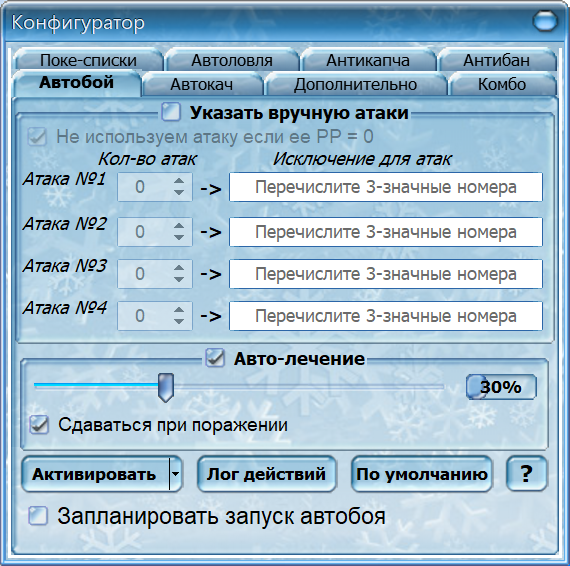
- Move order and auto-battle settings
- Client showing the OldPokemon login page
- Меню автоматизации OldPokemon
- Pokémon catching settings
- Auto-leveling
- Условия завершения боя
- Комбинации действий
- Pokémon lists
- Captcha service settings
- Паузы и ограничения
- Редкая ловля
- Ловля по критериям
- Дневник тренера
- Калькулятор статов и урона
- Журнал покемонов
- Напоминания
- Уведомления автобоя
- Маршрут лечения
- Мониторинг торговли
- Таблица боёв
- Auto-battle
- Автоматизация
- Auto-healing
- Примочки
- Опции
- Справка
About the bot
The PlayBots client for OldPokemon at oldpok.ru is presented through battle, catching, healing and scheduling settings. Features from other Pokémon projects are not assumed here: the page shows the inspected OldPokemon controls. Distinguish this client from the game’s Telegram login and built-in features.
- Auto-battle
- Auto-catch
- Auto-healing
- Battle scheduling
- Auto-leveling
- Условия завершения боя
Show all — 20
Battle and healing
- Auto-battle
Settings for four moves, repetition counts and exclusions
- Auto-healing
Healing threshold in battle settings
- Battle scheduling
Battle scheduling switch
Catching Pokémon
- Auto-catch
Pokémon, ball and post-catch action selection
Бой, лечение и прокачка
- Auto-leveling
ID цели, целевой уровень, условия противника и плохой погоды.
- Условия завершения боя
Уровень, опыт, характеристики противника, сдача и добиватель.
- Комбинации действий
Пять комбинаций с тремя действиями, повторами, лечением и условием против шайни.
- Паузы и ограничения
Учёт покемонов, денег и времени, реакции на чат/обмен и случайные перерывы.
- Уведомления автобоя
События, тип уведомления и время его закрытия.
- Маршрут лечения
Редактор локаций, NPC и телепортов до покецентра.
Ловля и покемоны
- Pokémon lists
Редкие и частые покемоны, номер напавшего и номера шайни.
- Редкая ловля
Выбор покебола и настройка списков редких.
- Ловля по критериям
Уровень, пол, характеры и шесть генов с выбором покебола.
Инструменты и настройки
- Captcha service settings
Ключ сервиса, баланс, лог, статистика и имитация клавиатуры.
- Дневник тренера
Десять вкладок заметок и инструменты обработки текста.
- Калькулятор статов и урона
Статы, диапазон урона, скрытая сила и гены.
- Журнал покемонов
Статистика появлений выбранного покемона.
- Напоминания
Заданное время и интервал, звук, сообщение и действие по таймеру.
- Мониторинг торговли
Список поисковых слов, запуск поиска и область сообщений.
- Таблица боёв
Игрок, победы, поражения и время боя.
System requirements
- Installation
- Get the client using the link on this page or request it from the author. Install it and select your game in the startup settings; confirm the appropriate version and engine before installation.
- Runtime requirement
- Game actions require a running client and a signed-in game account. This description is based on an interface inspection on 12 October 2026; in-game scenario execution was not tested. Confirm compatibility and the functions you need before payment.
How to get started
- 1
Ask how to get the client
Install and open the app.
- 2
Copy your ID
In the client’s About menu.
- 3
Activate or renew
All features included. Choose your access period.
Frequently asked questions
Need help?How do I activate access?
Open the About menu in the installed client and choose activation payment. Website payments require the 32-character client ID from this menu.
How do I renew access?
Use the payment option in your client’s About menu. For website payments, enter the same client ID.
What should I check before paying?
Make sure the features you need work in your game. Ask support about compatibility and refund terms before paying.