

 Bot forLeague of AngelsRoutine takes care of itself
League of Angels bot
PlayBots bot for the original League of Angels: daily routine and gemology settings, interface screenshots, access periods and help getting the client.
Open all screenshots (21)
About the bot
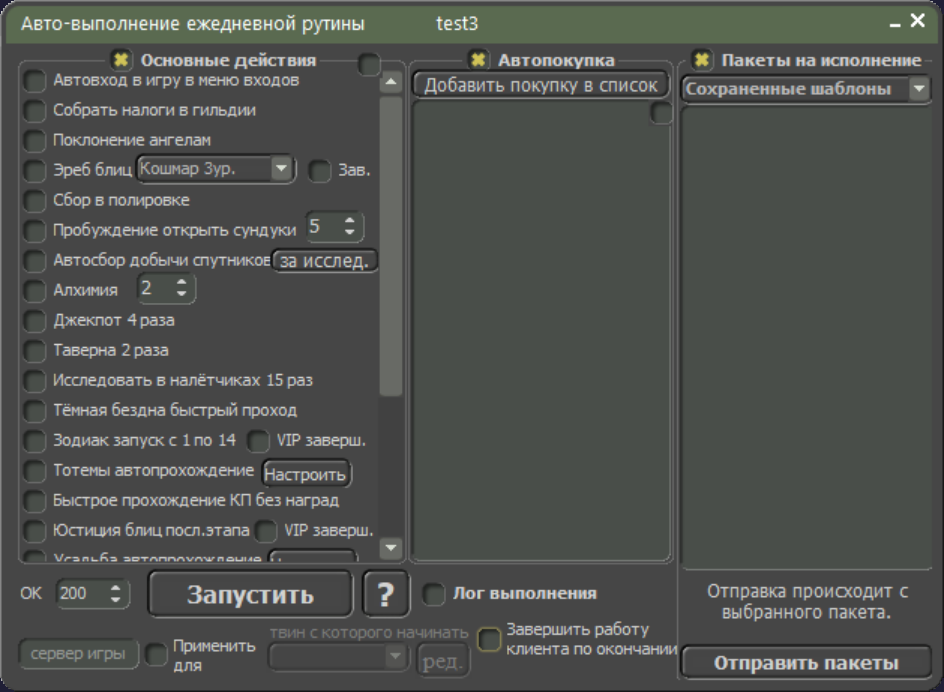
LOA Bot is intended for the original League of Angels (LOA). Screenshots show daily routine and batch gemology settings; the menus also list Expedition, Tarot Cards and other events. League of Angels 2 and 3 have separate catalog pages. Ask which client version and engine suit your platform before installing.
- Daily routine
- Batch automatic gemology
- Automatic reward collection
- Expedition
- Tarot Cards
- Action scheduler
Show all — 24
Daily actions and rewards
- Daily routine
Настройки повседневных действий, автопокупок и выполнения пакетов.
- Magic Shop purchases
Выбор предметов и цен, журнал обновлений и счётчики покупок.
- Automatic reward collection
- Guild contribution without VIP
- Hot Event reward collection
- Totems and automatic donations
Автопожертвование, попытки, этап и сбор наград.
- Chaos Atlas training
Выбор звёздности карт, героя и количества тренировок.
- Elemental dust training
Экранный и пакетный режимы, стихия, цена, скорость, герой и число тренировок.
- Homestead
Задания, предмет кузницы, координаты декора, сборы, библиотека и повторение.
Mini-games and events
- Gem Runner
- Batch automatic gemology
Геммология или укрощение дракона, ходы, очки, игровое поле и скорость.
- Toy Machine
Поиск предметов, комбинации, шаблоны, уведомления, число капсул, таймер и запрет прокрутки за алмазы.
- Tarot Cards
- Beach Treasure
- Djinni Merchant
Поиск предметов, уведомления или покупка, скидка, обновление и лимит траты монет.
Battles and adventures
- World Boss
Параметры атаки, усиления и переворота карт; отдельное движение к боссу.
- Raiders: collection and protection
- Last battle
- Campaign
Запись похода и воспроизведение выбранной записи.
- Expedition
Список игроков и боевая мощь, частота проверки, допустимые провалы и диапазон мощности целей.
Controls and scheduling
- Batch interactions
- Custom macros
- Action scheduler
- Log in with all alternate accounts
System requirements
- Installation
- Get the client using the link on this page or request it from the author. Install it and select your game in the startup settings; confirm the appropriate version and engine before installation.
- Runtime requirement
- Game actions require a running client and a signed-in game account. This description is based on an interface inspection on 12 October 2026; in-game scenario execution was not tested. Confirm compatibility and the functions you need before payment.
How to get started
- 1
Ask how to get the client
Install and open the app.
- 2
Copy your ID
In the client’s About menu.
- 3
Activate or renew
All features included. Choose your access period.
Frequently asked questions
Need help?How do I activate access?
Open the About menu in the installed client and choose activation payment. Website payments require the 32-character client ID from this menu.
How do I renew access?
Use the payment option in your client’s About menu. For website payments, enter the same client ID.
What should I check before paying?
Make sure the features you need work in your game. Ask support about compatibility and refund terms before paying.