

 Bot forLeague of Angels IIIMore progress every day
League of Angels 3 bot
PlayBots bot for League of Angels 3 (LOA III): routine, collection and guild settings, plus trial and portal menus. Access options and startup help.
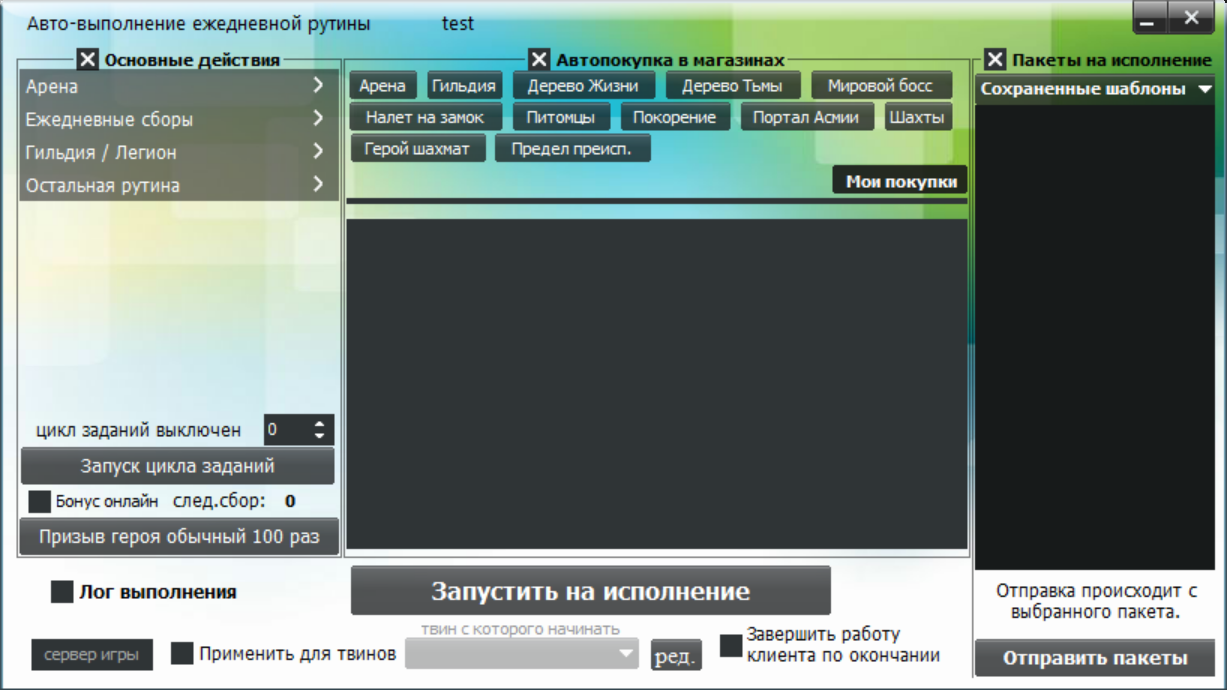
Open all screenshots (27)
- Daily routine
- Automation menu
- Daily collection
- Guild
- Additional tools
- Client options
- Automation menu
- Ежедневная рутина — арена
- Daily collection
- Налоги и взносы гильдии
- Остальная рутина
- Остальная рутина — продолжение
- Автопокупки — арена
- Автопокупки — питомцы
- Автопокупки — портал Асмии
- Дерево жизни и тьмы
- Испытание
- Conquest
- Mystic Domain
- Luminaries
- Castle raid
- Realm
- Elite Stages
- Война гильдий
- Resource War
- Automatic boss attacks
- Schedulers
About the bot
LOA III Bot is intended for League of Angels III, also known as League of Angels 3. Screenshots show daily actions, collection and guild settings; menus include bosses, trials and Mystic Domain. This product is for the third game, with separate pages for LOA 1 and 2. Confirm the game site, engine and client version before payment.
- Daily routine
- Automatic boss attacks
- Guild War: deployment
- Trial: automatic stage blitz
- Mystic Domain
- Action scheduler
Show all — 20
Daily actions
- Daily routine
Настройки арены, ежедневных сборов, гильдии и остальных задач; автопокупки из 12 категорий магазинов, сохранённые пакеты, журнал и применение к твинам.
- Automatic stamina collection
Guild and battles
- Automatic boss attacks
Отдельные настройки мирового босса и босса гильдии: автозапуск при появлении, интервал, задержка и количество атак.
- Guild War: deployment
Авторасстановка отряда в здание, приоритет положения и журнал действий.
- Resource War
Выбор области и шахты, настройки атаки и интервала, установки щита, автозахвата, уведомлений о потере и сбора сундуков; поиск игрока.
- Hero League: automatic attacks
- Conquest
Выбор текущего уровня и непобеждённого этапа, автосброс при запуске и журнал действий.
- Castle raid
Выбор одного из пяти рядов для атаки, сбор наград и количество открытий каждого сундука.
Trials and events
- Tree of Life and Darkness: automatic blitz
Выбор этапа и количества блицев для деревьев жизни и тьмы; для дерева жизни предусмотрены покупка попытки и использование билета.
- Chess Hero
- Trial: automatic stage blitz
Выбор этапов для камней душ, героев, золота, главного героя, навыков, продвижения и самоцветов; настройка покупки дополнительной попытки.
- Mystic Domain
Настройки 14 порталов с выбором этапа и покупкой попытки; автосбор сундуков.
- Underworld limit
- Luminaries
Запись этапа Солнца или Луны, режим блица x10 либо прохождения, предыдущий этап и покупка попыток.
- Realm
Выбор этапов звёздной эссенции, благословения, ясновидения и астрального поля; покупка попыток и лимит атак.
- Elite Stages
Выбор нужных наград в списке для автоблица соответствующих этапов.
Controls and scheduling
- Batch interactions
- Custom macros
- Action scheduler
Семь слотов планировщиков запуска действий.
- Log in with all alternate accounts
System requirements
- Installation
- Get the client using the link on this page or request it from the author. Install it and select your game in the startup settings; confirm the appropriate version and engine before installation.
- Runtime requirement
- Game actions require a running client and a signed-in game account. This description is based on an interface inspection on 12 October 2026; in-game scenario execution was not tested. Confirm compatibility and the functions you need before payment.
How to get started
- 1
Ask how to get the client
Install and open the app.
- 2
Copy your ID
In the client’s About menu.
- 3
Activate or renew
All features included. Choose your access period.
Frequently asked questions
Need help?How do I activate access?
Open the About menu in the installed client and choose activation payment. Website payments require the 32-character client ID from this menu.
How do I renew access?
Use the payment option in your client’s About menu. For website payments, enter the same client ID.
What should I check before paying?
Make sure the features you need work in your game. Ask support about compatibility and refund terms before paying.