

 Bot forLeague17Game website: league17.ru
 League17 bot
PlayBots bot for League17 at league17.ru: auto-battle, catching, leveling and Pokémon list settings. Interface screenshots, access periods and support.
Open all screenshots (11)
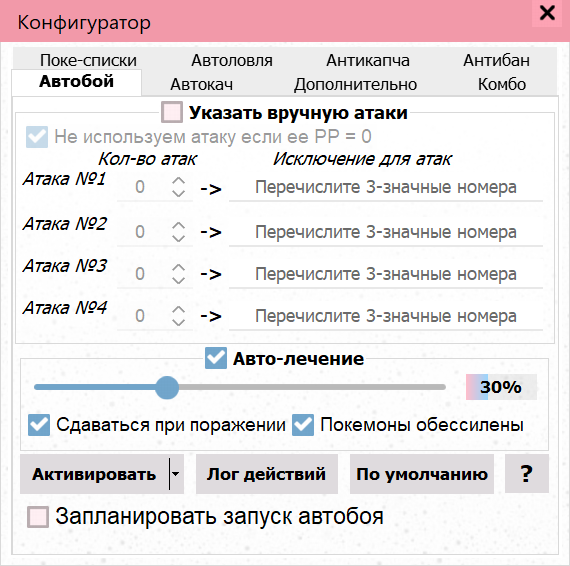
- Move order and auto-battle parameters
- Battle stop conditions and finishing move settings
- Pokémon, ball and post-catch action selection
- Auto-healing and Pokémon Center route menu
- Auto-leveling and weather restriction settings
- Меню автоматизации Лиги17
- Дополнительные инструменты Лиги17
- Automatic inventory menu
- Главное окно Лиги17 на странице входа
- Rare and common Pokémon lists
- Rare Pokémon catching settings
About the bot
The PlayBots client for League17 (League 17, league17.ru) includes settings for move order, PP, catching and target levels. Screenshots show Pokémon lists, stop conditions, healing and inventory menus. League17 and League17Reborn are different projects; choose the correct page and confirm compatibility before activation.
- Auto-battle
- Auto-catch
- Auto-leveling
- Auto-healing
- Automatic inventory tools
- Automatic navigator
Show all — 26
Battle and leveling
- Auto-battle
Manual move order, PP handling, surrender conditions and scheduling
- Auto-leveling
Target level, opponent and weather restrictions
- Stop conditions and finishing moves
Stop by level, experience or opponent; manual and automatic finishing moves
- Session limits
The Antiban section: time, money and Pokémon count limits, and pauses
- Combos
Pokémon action sequence settings
- Automatic arena
Предусмотрен отдельный пункт меню автоматизации
- Automatic gym battle requests
Предусмотрен отдельный пункт меню автоматизации
- Auto-leveling scheduler
Предусмотрен отдельный пункт меню автоматизации
Catching and collection
- Auto-catch
Pokémon, ball and post-catch action selection
- Rare Pokémon catching
Separate ball and list selection
- Pokémon lists
Rare, common and shiny Pokémon: save and load lists
- Automatically move hatched Pokémon
Предусмотрен отдельный пункт меню автоматизации
- Find breeding pairs
Предусмотрен отдельный пункт меню автоматизации
Healing, routes and inventory
- Auto-healing
Pokémon Center, arena healing and route editor
- Automatic inventory tools
Equipment menu: diving gear, water, bait, nets, scanner, fishing rod and other items
- Automatic navigator
Предусмотрен отдельный пункт меню автоматизации
- Automatic item breaking
Предусмотрен отдельный пункт меню автоматизации
- Automatically turn in broken items
Предусмотрен отдельный пункт меню автоматизации
- Maze navigation guide
Предусмотрен отдельный пункт меню автоматизации
Trading and events
- Automatic snow or paint throwing
Предусмотрен отдельный пункт меню автоматизации
- Automated advertising
Предусмотрен отдельный пункт меню автоматизации
- Auction assistant
Предусмотрен отдельный пункт меню автоматизации
- Halloween candy collection
Предусмотрен отдельный пункт меню автоматизации
- Halloween: respond to attackers
Предусмотрен отдельный пункт меню автоматизации
- Fair: automatic turn-in
Предусмотрен отдельный пункт меню автоматизации
Services
- Captcha service settings
Service key, balance, statistics and log
System requirements
- Installation
- Get the client using the link on this page or request it from the author. Install it and select your game in the startup settings; confirm the appropriate version and engine before installation.
- Runtime requirement
- Game actions require a running client and a signed-in game account. This description is based on an interface inspection on 12 October 2026; in-game scenario execution was not tested. Confirm compatibility and the functions you need before payment.
How to get started
- 1
Ask how to get the client
Install and open the app.
- 2
Copy your ID
In the client’s About menu.
- 3
Activate or renew
All features included. Choose your access period.
Frequently asked questions
Need help?How do I activate access?
Open the About menu in the installed client and choose activation payment. Website payments require the 32-character client ID from this menu.
How do I renew access?
Use the payment option in your client’s About menu. For website payments, enter the same client ID.
What should I check before paying?
Make sure the features you need work in your game. Ask support about compatibility and refund terms before paying.