

 Bot forOrtrusGame website: www.orthrusonline.ru
 Orthrus Online bot
PlayBots bot for Orthrus Online at orthrusonline.ru: battle, catching, healing and stop-condition settings. Client screenshots and access help.
Open all screenshots (31)
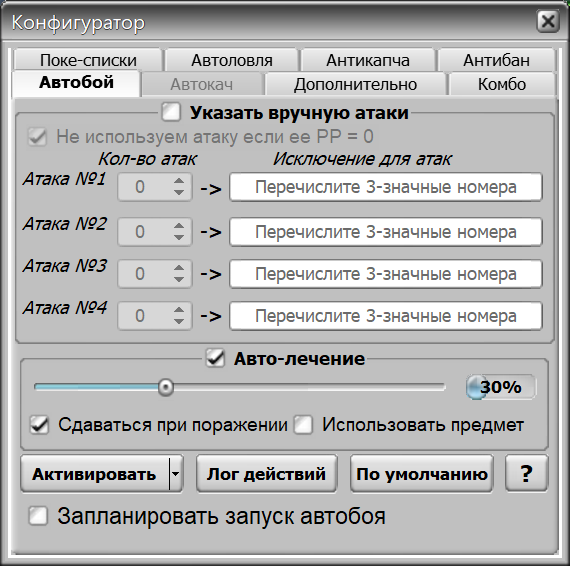
- Move order and auto-battle settings
- Client showing the Orthrus Online login page
- Меню автоматизации Ортрус
- Pokémon catching settings
- Captcha service settings
- Stop conditions and finishing moves
- Меню автолечения
- Stop conditions and finishing moves
- Комбинации действий
- Pokémon lists
- Captcha service settings
- Паузы и ограничения
- Редкая ловля
- Ловля по критериям
- Дневник тренера
- Калькулятор статов и урона
- Журнал покемонов
- Напоминания
- Уведомления автобоя
- Маршрут лечения
- Мониторинг торговли
- Таблица боёв
- Организатор турниров
- Покебаза
- Регион лечения
- Настройка автобоя
- Auto-catch
- Automation menu
- Меню лечения
- Additional tools
- Настройки клиента
About the bot
This bot is for the browser project Orthrus Online at orthrusonline.ru, also spelled Ortrus. The page shows battle and catching configuration plus additional stop conditions. Auto-leveling was inactive during the interface inspection, so it is not offered here as a confirmed capability. Ask the author which settings are available after login.
- Auto-battle
- Auto-catch
- Auto-healing
- Battle scheduling
- Automated advertising
- Captcha service settings
Show all — 23
Battle and healing
- Auto-battle
Settings for four moves, repetition counts and exclusions
- Auto-healing
Healing threshold in battle settings
- Battle scheduling
Battle scheduling switch
Catching Pokémon
- Auto-catch
Pokémon, ball and post-catch action selection
Additional options
- Automated advertising
Отдельный пункт меню автоматизации
- Captcha service settings
Ключ сервиса, баланс, лог, статистика и имитация клавиатуры.
- Stop conditions and finishing moves
Уровень, опыт, характеристики противника, сдача и добиватель.
Бой, лечение и прокачка
- Комбинации действий
Пять комбинаций с тремя действиями, повторами, лечением и условием против шайни.
- Паузы и ограничения
Учёт покемонов, денег и времени, реакции на чат/обмен и случайные перерывы.
- Уведомления автобоя
События, тип уведомления и время его закрытия.
- Маршрут лечения
Редактор локаций, NPC и телепортов до покецентра.
- Регион лечения
Меню ручного выбора региона для лечения.
Ловля и покемоны
- Pokémon lists
Редкие и частые покемоны, номер напавшего и номера шайни.
- Редкая ловля
Выбор покебола и настройка списков редких.
- Ловля по критериям
Уровень, пол, характеры и шесть генов с выбором покебола.
- Покебаза
Карточка покемона: статы, гены, характер, атаки, предмет и отметки.
Инструменты и настройки
- Дневник тренера
Десять вкладок заметок и инструменты обработки текста.
- Калькулятор статов и урона
Статы, диапазон урона, скрытая сила и гены.
- Журнал покемонов
Статистика появлений выбранного покемона.
- Напоминания
Заданное время и интервал, звук, сообщение и действие по таймеру.
- Мониторинг торговли
Список поисковых слов, запуск поиска и область сообщений.
- Таблица боёв
Игрок, победы, поражения и время боя.
- Организатор турниров
Список игроков, сканирование локации и создание групп.
System requirements
- Installation
- Get the client using the link on this page or request it from the author. Install it and select your game in the startup settings; confirm the appropriate version and engine before installation.
- Runtime requirement
- Game actions require a running client and a signed-in game account. This description is based on an interface inspection on 12 October 2026; in-game scenario execution was not tested. Confirm compatibility and the functions you need before payment.
How to get started
- 1
Ask how to get the client
Install and open the app.
- 2
Copy your ID
In the client’s About menu.
- 3
Activate or renew
All features included. Choose your access period.
Frequently asked questions
Need help?How do I activate access?
Open the About menu in the installed client and choose activation payment. Website payments require the 32-character client ID from this menu.
How do I renew access?
Use the payment option in your client’s About menu. For website payments, enter the same client ID.
What should I check before paying?
Make sure the features you need work in your game. Ask support about compatibility and refund terms before paying.